An AI book summariser for publishers
- Masha Levine
- Jan 2
- 7 min read

Updated: Jan 2

Introduction
It is a truth universally acknowledged that in the process of searching for a new opportunity, a product designer must be in want of a home assignment - however contentious it may be. And once an assignment has been completed with all the bells and whistles - think research, ideation, iterations, high fidelity wireframes, prototypes, and who can forget the shiny presentation that tops it all off - the beleaguered designer is left with what is sometimes a fully formed product concept and case study, and not always a job offer to go alongside it.
I've been this designer, and maybe you've been this designer as well. And I've had assignments where despite getting the green light and passing onto the next stage, I haven't gotten that sought after offer. The case study that I will present here happens to be one of these scenarios, and instead of letting it sit in the Figma graveyard, I've decided to publish it as a post in my portfolio to further show my thinking and design process. So sit back and grab a cuppa, and follow along this case study with me (and sorry to disappoint, but I won't be revealing which company assigned this task! 🤪)
The task
Objective: Design a book summarising service aimed at helping publishers reach and engage new readers by providing concise, compelling, and value-driven summaries of books. The service should cater to both publishers' goals of increasing book exposure and readers' preferences for quick, digestible content.
Scope: Focus the solution on the publisher’s ‘Create Summary’ web experience only. The reader’s view is outside the scope of this task.
Deliverables: 2-3 designed screens that best present your solution.
Case structure
Scenario context and assumptions
Framing the problem, objective, and success criteria
User persona and story
Research
Defining the AI model
User flow
Design development (low-fi)
Final designs
Future considerations
Scenario context and assumptions
Context
In order to understand the scenario better, I researched how publishers create summaries of books in their catalogue. I discovered that it’s a multistep, collaborative process:

While the focus of the task is creating the summary, the added context of iterations and approvals as well as adaptation for channels (elevator pitch, back cover, long synopsis etc) is important to consider for the design.
Publishing houses don’t just “summarise”, they position (in this case, for engaging new readers). The summary is part marketing copy, part metadata, and part sales tool.
Assumptions made
After reviewing the task, I identified a clear marketing angle: “aimed at helping publishers reach new readers” and “publishers’ goals of increasing book exposure”.
My design will therefore focus on building a product that not only summarises but also supports these marketing objectives.
For this task, I’ve defined the Create Summary flow as including: input, draft generation, editing, and sharing the summary.
Framing the problem, objective, goals, and KPIs
The problem
Publishers struggle to engage new readers in their books, while readers are overwhelmed by long-form content and disengage quickly.
The opportunity/objective
Help publishers reach and engage new readers by designing an AI tool that generates consistent, digestible summaries for multiple types of channels that can bridge the gap between publishers’ need for reach and readers’ desire for quick consumption.
Goals
Business goal: increase book visibility and engagement for the publishers (this is the marketing angle)
User goal: provide publishers with an easy and reliable tool for producing summaries. (this is the “create summary” flow angle)
Potential KPIs
% of summaries accepted without heavy rewriting (indicator of draft quality).
Average time from upload to first draft generated (AI speed).
User persona and story
User persona
WHO: Small to midsized publishers who value efficiency, and are looking to create summaries that not just explain, but sell.
WHAT: They want quick tools to create summaries without investing too much into manual editing. They may create multiple summaries in bulk so efficiency matters.
WHY: They care about consistency, brand voice, and exposure.
HOW: They are not highly technical (AI being such a new tool in the workplace, and publishing is a traditional, rather than hitech industry) so the interface should be simple and guided.
User story
As a book publisher,
I want to quickly generate a compelling book summary,
So that I can expose my book to more/new readers without spending hours editing and writing a summary.
Acceptance criteria:
I can upload book content and get an AI-generated draft summary.
I can specify exactly which readers I want to engage with my summary.
I can edit the summary to ensure it is accurate, on-brand, and high quality.
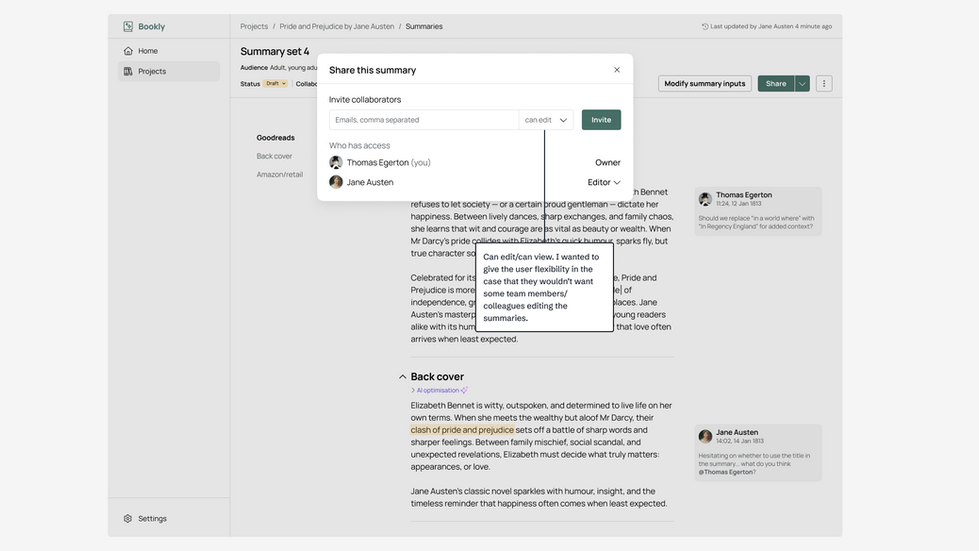
I can share the final summary with my team and collaborate on iterations.
Research
Publishing world research
Further research into the general workflow of a publisher, I discovered that publishers will already have the full manuscript file.
Publishers work collaboratively with the writers and editors so the platform must support this.
There are multiple channels that require different types of summaries (eg. a back cover summary will differ from an Amazon listing summary), and the tool will need to cater to these different options.
Competitor research
I started out by researching potential competitors to see what the industry best practices might be. While I didn’t find a product that fit the exact brief (where the user is a publisher, B2B), I found products that were similar (either geared towards readers B2C, or marketers B2B) such as iWeaver, Semanticpen, Book Summary AI, Musely.ai, and Jasper.
These products can be categorised as either conversational AI models or AI powered SaaS.
Conversation AI models
iWeaver:

SemanticPen:

AI powered SaaS
Jasper:


Muse(dot)ai

Competitor research conclusion
The chatbot style AI is too broad - it would require the user to give a set of very specific instructions which is time consuming. They also were not limited in scope - I could ask it about the weather, and it would lead me down a rabbit hole.
The AI SaaS models were much more precise - Jasper especially. While Jasper didn’t have a model specifically for summarising and marketing books, I tested out the Content Summariser model which allowed me to add tone and gear towards an audience. Both of these are important considerations for my design.
In short, I think the Jasper AI model was a success however it was an overly complex flow (adding tone and audience was a multistep modal) for this specific assignment. As one of my objectives is efficiency, what I will design must not be overly complex.
I’m completely ruling out a chatbot style model as this will be too time consuming and vague.
Defining the AI model
It’s important to define the AI model because not only does it grounds my design in real-world mechanics, but it will ensure the summaries are not just accurate but tailored to publishers’ marketing goals, producing outputs they can trust.
The flow will have several stages, and in each stage the AI will have different roles:
Input stage
Manuscript ingestion: upload full text (doc or pdf). AI parses chapters, recurring concepts, metadata, narrative patterns, and structural elements.
Processing stage
Channel-specific rules applied (length, format, tone nuances, these are detailed below).
The AI will tailor the summary according to the data the user has input (audience, genre, and channel)
The AI has built-in knowledge of literary audiences, genres, and their marketing and writing/tone conventions. Example: Young adult fantasy → hooks like destiny, secret, rebellion, magic.
Output stage
Matches the book’s content with a library of channel + genre keywords. Example: If the user selects “YA” as the target audience age, the AI generates a summary that will use compelling terms to engage with that audience, and will adjust the tone and length of the summary to match.
Controls for specific rewrites (length/tone/style)
Under the hood
Fine-tuned models trained on marketing copy, not generic summarisation.
Channel specific rules
Based on my research into publication channels for book summaries, I've identified five main types, each with specific rules and requirements:
Channel | Length | Key rules |
|---|---|---|
Back cover | 80-150 words | Lead with hook, end with cliffhanger/tagline, avoid detail |
Amazon/retailers | 200-300 words (first ±200 visible) | Use SEO keywords, short paragraphs, no spoilers, implicit CTA |
Publisher website | 150-300 words | Include metadata, author creds, factual details, SEO |
Publisher catalogue (B2B) | 100-150 words | High-concept lead, comps, concise genre clarity, bullet points if needs |
Goodreads/reader community | 150-200 words | Avoid sales language, focus on themes, encourage conversation |
User flow
Below is the user flow I've designed for publishers creating book summaries.
I’ve made sure to account for cases where the user is not fully satisfied with the AI generated summaries.
Guiding the tool:

Editing, iterating, and sharing the summary:

Design development
Input modal and context
I wanted to set the context for my design - I’ve defined it that the platform will organise summaries per project (where each project is a single book). Hence the tool will already have the manuscript, title, and author name on hand: the user needs to only put in audience, tone (in the final design this input was changed to genre in order to focus it more on engaging with potential new readers), and genre preferences.

Editor interface
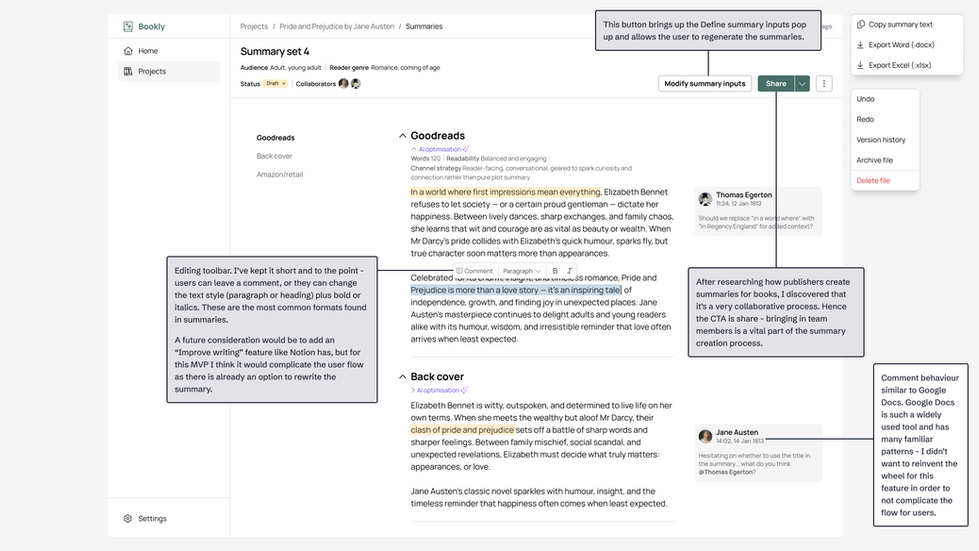
For the editor interface, I took inspiration from Notion, Google Docs, and Confluence. I find all three platforms incredibly user friendly and flexible. I firstly wasn’t sure about the layout and ended up changing it to match the second sketch. Keeping the collaboration factor in mind, I experimented with comments and tags.

Final designs
Step 1: entering the book's home page
(click arrow for annotated view)


Step 2: Create new summary (defining the inputs)


Step 3: first entry into summeriser interface


Step 4: edit and collaborate


Step 5: sharing the summary


Future considerations
Each task has a set amount of time allocated to it - this means that potential ideas don't always make it to the design. Here are three considerations that I had if I had more time to develop this product:
Deeper marketing focus I would want to further research and develop the marketing aspect for this tool. For example, how could we measure the marketing success of a summary beyond Google Analytics?
Integrating with popular publishing channels The create summary could seamlessly transition to publishing to multiple channels such as Goodreads, Amazon, social media, etc. I didn’t address it in this task as the brief stated to focus on creating the summary - not publishing it.
Improve writing action toolbar I didn’t add this function in as it would complicate and flow and doesn’t fit in with the user persona I’ve crafted: quick and efficiency focused. However, it could be a great future addition for an AI-savvy user who won’t get lost in a rabbit hole of constant and specific rewrites.
Comments